AWS honeypots and canary credentials
A canary credential is a real AWS access key that nobody legitimate has a reason to use. Plant it where an attacker looks first, and the moment someone uses it you know two things: a credential was stolen, and exactly where it was stolen from.
From DevOpsDays Barcelona
If you scanned the QR code on the last slide of Ilia Dubovskii's Ignite talk at DevOpsDays Barcelona (Saturday 14 November 2026), you're in the right place. The talk makes one argument: don't wire automation to alerts that are only probably right. Wire it to signals that are certain, and use actions you can undo. A planted fake credential is the cheapest certain signal you can build. The talk page has the slides and notes. The argument is written out further down this page.
Coming after the talk
Replay video and Terraform
The recorded replay and the Terraform behind it will be published here after the talk on 14 November. Until then, the AWS canary credentials guide has complete Terraform for your first canary.
Inside Compass
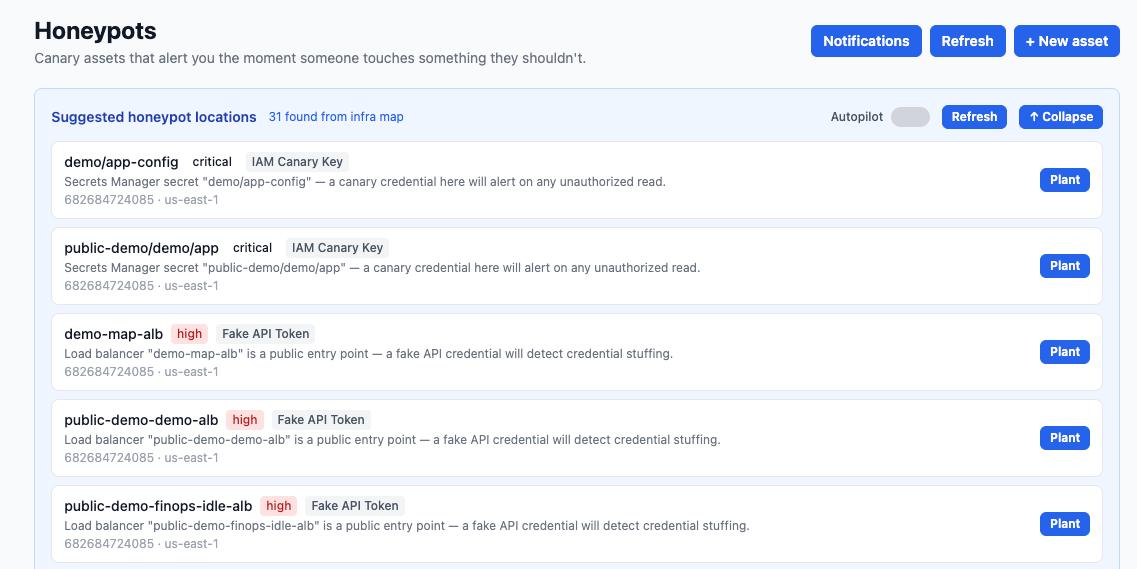
Compass suggests canary locations from its map of your AWS infrastructure, ranked critical, high and medium. "Plant" opens a Terraform pull request.
Keep your detection rules, because they give you coverage. A canary does a different job. It covers a narrow area, and when it fires the signal is confident enough to act on straight away.
Automate on certainty
Some of your alerts are already certain enough. Automate those. A GuardDuty finding for EC2 instance credentials used from outside AWS, or a Falco rule for a shell spawned inside a production container, is high-confidence. If you trust it, wire an automatic response to it. The principle isn't "canaries good, alerts bad". It's automate on certainty, and canaries happen to be the cheapest way to create certainty where you don't have it yet: no agents, they work on ECS Fargate, and you can set one up in an afternoon.
Base rates. Take an outbound-traffic or CPU alert. Suppose one firing in a thousand is an attack. If you auto-kill the workload every time, your automation is wrong 999 times out of 1,000, and each of those is an outage you caused yourself. So you put a human in front of it, and late on a Friday that human reasonably decides it's probably a deploy and looks again on Monday. A canary flips the ratio. Nobody legitimate uses it, so almost every trip is real.
Symptom vs intent. A health or anomaly alert measures an effect: CPU, egress, cost. It fires after damage has started, against a baseline that attackers can hide inside, and it tells you that a service looks off. A canary trip measures a decision. Someone found a credential, judged it worth stealing, and used it. There's no baseline to tune, and the key tells you exactly which host, task or repo it came from.
Health alerts still matter. They exist for capacity and reliability, and the right response to them is a human with a plan, not a kill switch.
AI acting on maybes is dangerous. AI acting on certainty, with an action you can undo, is good engineering.
The framework behind this (only automate actions that are verifiable, reversible and contained) is written up in our autonomous DevOps guide.
Vendor-neutral guide
Complete Terraform for a deny-all IAM canary and its alerting, how to cover every region, why attackers can fingerprint the account ID, where to plant keys and where not to, and how to test safely. It also compares canarytokens.org and Thinkst Canary honestly.
You can run one canary by hand. Compass is for teams that want canaries placed where they matter, planted through code review, and tracked over time.
Compass scans your AWS environment and links resources to your Terraform state and GitHub repos.
From the map, Compass suggests where an attacker is likely to look first and ranks each location by severity.
Compass generates the Terraform and opens a GitHub pull request against your infrastructure code. Nothing changes in your account until you review and merge it.
A call made with the canary key is recorded by CloudTrail, matched by an EventBridge rule, queued in SQS and sent to Slack or PagerDuty.
Each placement is recorded, so an alert maps back to where that key was planted. The alert also carries the API call and source IP from the CloudTrail event.
Planting is a reviewed PR, so what exists and why lives in your Git history instead of in someone's console session.
This page gets read by engineers, so here is the status without rounding up. Last reviewed 4 October 2026.
sts:GetCallerIdentity, usually an attacker's first call, through the EventBridge read-only management events state. The guide explains why this matters.ecs:StopTask containment of the exact task that used it. This is what the talk demonstrates. It is not available yet.We don't publish alert latency or false-positive rates yet because we haven't measured them on enough runs. When we have, they'll appear here with the method.
A canary arrives as a pull request against your infrastructure code. You see exactly what will exist in the account before it exists.
+ resource "aws_iam_user" "svc_backup_reporting" {
+   name = "svc-backup-reporting"
+   path = "/service/"
+ }

+ resource "aws_iam_user_policy" "svc_backup_reporting" {
+   name   = "backup-reporting"
+   user   = aws_iam_user.svc_backup_reporting.name
+   policy = jsonencode({
+     Version   = "2012-10-17"
+     Statement = [{ Effect = "Deny", Action = "*", Resource = "*" }]
+   })
+ }

+ resource "aws_iam_access_key" "svc_backup_reporting" {
+   user = aws_iam_user.svc_backup_reporting.name
+ }

+ resource "aws_cloudwatch_event_rule" "svc_backup_reporting" {
+   name          = "backup-reporting-activity"
+   state         = "ENABLED_WITH_ALL_CLOUDTRAIL_MANAGEMENT_EVENTS"
+   event_pattern = jsonencode({
+     "detail-type" = ["AWS API Call via CloudTrail"]
+     detail = {
+       userIdentity = {
+         accessKeyId = [aws_iam_access_key.svc_backup_reporting.id]
+       }
+     }
+   })
+ }
Simplified for illustration. The state line is what makes EventBridge match read-only calls such as sts:GetCallerIdentity. Compass is adding it now (see status). The guide has the full version with targets and multi-region coverage.
| Traditional honeypot server | Canary credential | |
|---|---|---|
| Deployment | Dedicated VM or appliance, manual setup | A few Terraform resources |
| Maintenance | Patching, uptime, cost | No servers or agents: native IAM, CloudTrail and EventBridge |
| Works on Fargate / serverless | Not without extra infrastructure | Yes. It's just an env var, file or secret |
| Alert fidelity | Internet-facing ones see constant scanner noise | High by design, because nobody legitimate uses it |
| What a trip tells you | Someone touched the decoy | A credential was stolen from the exact place you planted it |
An AWS honeypot is a decoy placed in or near your AWS environment that no legitimate person or process should ever touch, so any use of it signals an intruder. The most practical kind is a canary credential: a real IAM access key with an explicit deny-all policy, planted where an attacker would look. The key can't do anything, but every call made with it is recorded by CloudTrail and can raise an alert within minutes. See the step-by-step guide.
A honeypot is the general idea: any decoy resource built to attract an attacker, often a whole fake server. A honeytoken is a decoy piece of data rather than a system, such as a credential, a database row, a document or an API key. A canary token is a honeytoken wired to alert you when it's used. The name comes from Thinkst's free canarytokens.org service, and people now use it generically. An AWS canary credential is a honeytoken and a canary token at the same time.
For your real keys: turn on GuardDuty, which has findings for credentials used in unusual ways or from outside AWS. Enable secret scanning on your repositories, watch IAM access key last-used data, and prefer short-lived role credentials over long-lived keys. To detect the act of stealing, plant canary keys where real keys would live. Any call made with a canary key, including the sts:GetCallerIdentity check most attackers and scanners run first, shows up in CloudTrail. You can alert on it with EventBridge (state ENABLED_WITH_ALL_CLOUDTRAIL_MANAGEMENT_EVENTS, deployed in every region) or with a multi-region trail feeding a CloudWatch Logs metric filter. The guide has the Terraform for both.
Yes. A canary credential is only a string, so it works anywhere a real credential would sit: a task-definition environment variable, a mounted file, a Secrets Manager secret, a CI variable. Detection happens in AWS (CloudTrail, then EventBridge or CloudWatch Logs), not on the host, so there's nothing to install in the container. That's why canaries suit Fargate and serverless workloads, where you can't run a host agent.
For one or two AWS key canaries, canarytokens.org is free and takes a minute. Thinkst runs the AWS account for you, and alerts come by email or webhook. The catch is that its free AWS keys live in a small set of known Thinkst accounts, and secret scanners such as TruffleHog now recognise them offline. Thinkst Canary, the commercial product, is mature, covers far more than AWS (hardware, virtual and cloud canaries plus tokens), and its paid tokens don't share that known-account problem. If you want one canary you own and understand, the DIY Terraform in our guide is an afternoon's work. Compass is for teams that want placement suggested from a map of their own infrastructure, planted and reviewed as Terraform PRs in their own account, and wired into an automated response. It's newer and narrower than Thinkst: today only the IAM canary is available.
They might, so design for it. Names, paths, tags and descriptions should look like your other service users, with no "canary" or "honeypot" anywhere. The harder problem is the account ID. Anyone holding an access key can learn which AWS account owns it, either by calling sts:GetAccessKeyInfo (logged only in the caller's account, not yours) or by decoding it offline from the key ID. A key whose account matches a known canary provider is easy to spot. Keys in your own account look real but put the canary user in production. Keys in a dedicated account keep production clean but sit in an account with no other footprint. Pick one consciously. Compass is adding neutral naming in the release it's targeting for November 2026; until then, read the Terraform PR before you merge it.
CloudTrail records the call, including the API name, source IP, user agent and the access key ID. An EventBridge rule matches it and the event reaches your alerting. In Compass that path runs through SQS to Slack or PagerDuty. Because each key is planted in exactly one place, the key ID tells you where it was stolen from: that CI runner, that task definition, that repo. Contain the source first (stop or isolate the workload, rotate the real credentials it could reach), keep the canary key active so you keep seeing what the attacker tries, then plant a fresh one once you're done. Automatic containment, such as stopping the exact ECS task, is in development in Compass and not available yet.
No. Keep your detection rules, because they give you broad coverage. A canary covers only the places you plant it, but when it fires there's very little doubt. That makes it the alert you can act on immediately and the natural place to start automating a response.
Do it for the ones that are already certain, such as a trusted GuardDuty finding or a Falco rule for a shell in a production container. For symptom alerts like CPU, egress or cost, base rates are against you. If one firing in a thousand is an attack, an automatic kill is wrong 999 times, and each of those is an outage you caused yourself. Those alerts also fire after the damage, against a baseline attackers hide in. A canary trip measures intent instead: a stolen credential was used, from one known place. Automate on certainty, with an action you can undo.
Compass suggests placements from its map of your AWS infrastructure, ranked by severity, and generates the Terraform as a pull request in your infrastructure repo, so nothing changes until you merge. Each placement is recorded, so an alert maps back to where the key was planted. Today that covers IAM canary credentials alerting to Slack or PagerDuty. Read-only call coverage, all-region rules, neutral naming, ECS task-definition injection and a decoy database with automatic task containment are in development. Rotation, S3 objects and Secrets Manager decoys are on the roadmap.
Plant one key by hand this afternoon with the guide. If you later want placement, review and lifecycle managed for you, that's what Compass is for.
More for cloud teams: Autonomous DevOps · All guides · DevSecOps · The talk
 Beamreach